VAT
VAT report: check, book and reconcile your VAT period
The VAT report now helps you make sure your accounting is complete before you submit your VAT report. It can also automatically lock and reconcile the period once the VAT report is booked.
Fix: Incorrect discrepancy warning fixed
Fixed an issue where the VAT report could incorrectly show the entire period’s VAT as a discrepancy, even when the VAT accounts matched the report. The warning now only appears when there is an actual discrepancy.
Online VAT reporting — Sweden only
You can now submit VAT declarations to Skatteverket without leaving Briox. Briox checks that everything is ready, lets you submit a draft for validation, and keeps you informed of the declaration status.
Read more here.
Coming soon: The possibility to file corrections for previously submitted and locked periods online.
Supplier Invoices
Supplier invoices: Flag as paid
Let colleagues mark an invoice as paid without affecting the accounting.
The new Flag as paid option makes it easy to signal that an invoice has already been paid, even before it is posted or reconciled. Flagged invoices are clearly marked, cannot be paid again, and the flag is removed automatically when a payment is posted.
Enable the feature per company under Settings → Approval settings → Supplier Invoice. Read more here.
Pay directly from the supplier invoice
A Pay button has been added to the supplier invoice edit page, so an invoice can be sent to payment
without going via the payment list. It appears when an open banking payment method is active in the
company.
Banking
Get your transactions the moment you connect
No more waiting until tomorrow to start working.
When you finish connecting a bank account through Open Banking, Briox now asks Do you want to import transactions from the bank now? Say yes and your transactions are fetched straight away, with a message telling you how many came in — so you can start reconciling immediately without waiting for the nightly import.
If there's nothing new to fetch, Briox says so.
Do not forget to enter a Fetch transactions from date (Maximum 90 days back in time).
Customer invoicing
Invoice numbers and OCR references
The default customer invoice counter for new companies now starts at 100. Invoice numbers of 10 or lower cannot
produce a usable OCR reference, so Briox now also warns you when an invoice is about to get such a
number.
Household services / ROT & RUT — Sweden only
Material can now be marked as Other/Övrigt directly on the item and automatically carried over to invoices, enabling fully automated ROT/RUT invoicing.
Accounting
BAS 2026 — Sweden only
Sweden’s standard chart of accounts, BAS, has been updated for 2026 and is now available in Briox as the standard chart of accounts.
If you already work in Briox, you decide whether and when you want to switch to BAS 2026.
Read more about the changes between BAS 2025 and BAS 2026 here.
Incoming documents and automation
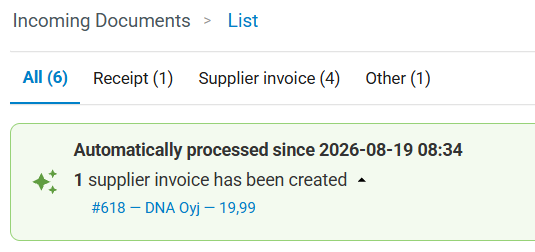
See what automation has done
Incoming Documents now shows a banner with an overview of documents handled automatically since you last dismissed it. Expand each category to see the individual documents and click on them to drill down to the journal.
Get an overview of active automation settings
When you first open Incoming Documents, a new overview shows which automation settings are active for the company, with a link to the actual settings. You can reopen the overview at any time using the new automation button. The overview is only available to users who have access to automation settings.
Coming Soon
We are working on a brand new look....
In order to improve and simplify the everyday experience Briox Classic is getting a fresh new look which will arrive gradually, one part of the interface at a time
The first step gives every page a cleaner frame:
- A top bar that shows the name of the page you're on
- A left navigation that stays in place as you scroll
- A refreshed, consistent set of icons.
The new design is optimised for desktop and tablet.
New in the top bar

-
Quick Create (+): A new "+" button opens a Quick Create window so you can create a new item — a customer, supplier, invoice, quote, order, journal entry, payment, asset and more — from anywhere, without leaving the page you're on. It shows only the items you have the Access right to create.
-
Favourite reports: Pin the reports you use most and open them from the top bar on any page. Read more about favourite reports.