Under Admin - User you can keep track of Pending User Registration and Pending Invitations.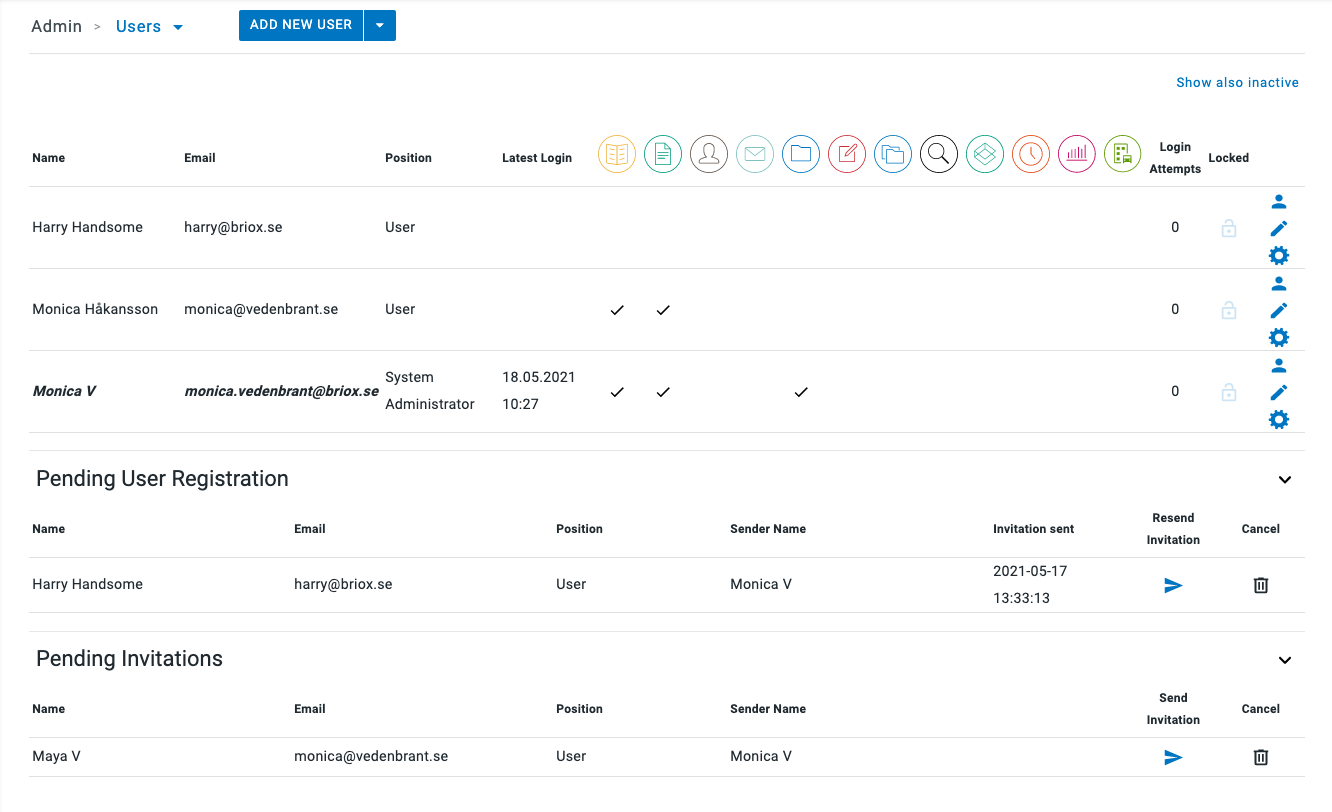
Pending User Registration list
In this list, you can see all the new user invitations you have sent.
A new user will stay on this list until they have activated their account via the email activation link.
After activation, the user will be moved to the regular user list at the top of the page.
In this Pending user list, you can do the following:
- Cancel the invitation by clicking on the bin icon. This removes the user invitation and voids the activation link immediately.
- Resend the user invitation. This is useful if for some reason, user did not receive the invitation email.
Note! If the user should not receive the invitation despite several attempts, it is good to check email settings for ex. spam filtering and such at the receiving end.
Pending Invitations List
When you are registering a new client and end user, at the end of the registration process, you have the option to send the invitation later, at a point in time that suits you.
If this option is chosen, the invitation lands in the Pending Invitations list in the client account you have just set up.
In this Pending Invitation list, you can do the following:
- Send the user invitation. When the e-mail invitation containing an activation link is sent, the user is moved to the Pending User Registration list above.
- Cancel the invitation by clicking on the bin icon. This removes the user invitation and voids the activation link immediately.