Auditor Viewing licences
Viewing licences have been created in Briox so that you as an accounting agency or company can easily invite your Auditor to your Briox account without having to assume any extra licence costs.
Viewing licences are free of charge.
Viewing licences will give the invited auditors access to your Accounting and/or Invoicing modules as well as any linked documents. The Auditors will also have the possibility to see all reports and print these. Read more here.
We have even prepared an Auditor Manual so that they can easily navigate your account even if they are new to Briox!
Updated design in Briox
The Dashboard, the program menu and the header have been updated with a new design.
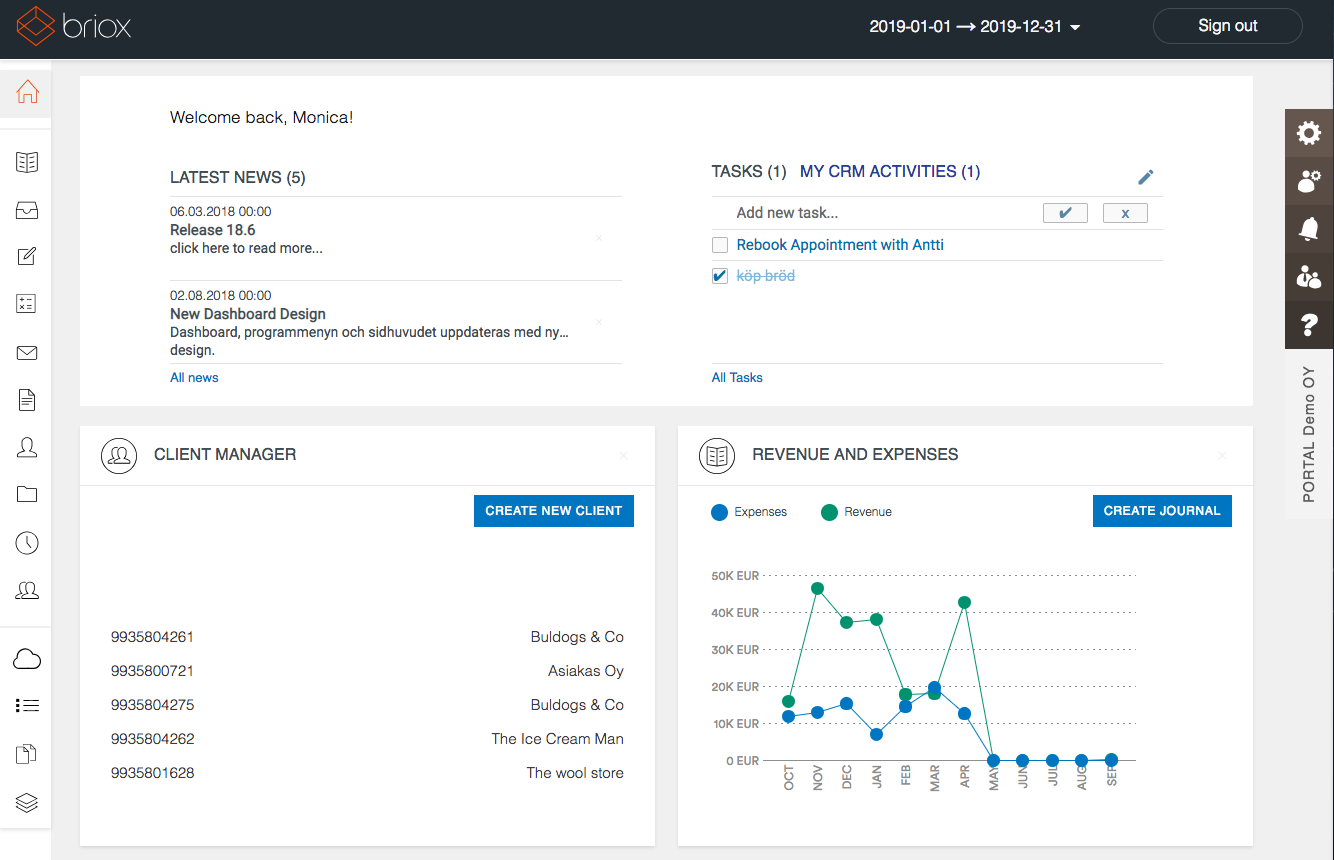
New in the header
- The sign-out button has a new look
- The possibility to create a new financial year from the financial year selector. This is if the user is the Application Administrator for Accounting or Invoicing
New in the dashboard
- New look for the news section
- Updated graph design in the dashboard cards
New in the program menu
The program menu has undergone a face lift. The biggest change here is that support functions, such as the Registry and Reports have been delimited by a dividing line.
Extended autocomplete for journals and supplier invoices
Under Settings - Accounting - Autocomplete, we have added the option to enable autocomplete for the following fields:
Journal - Description
Journal - Transaction information
Supplier invoice - Transaction information
Read more about Autocomplete.
EAN-codes on your printout templates